


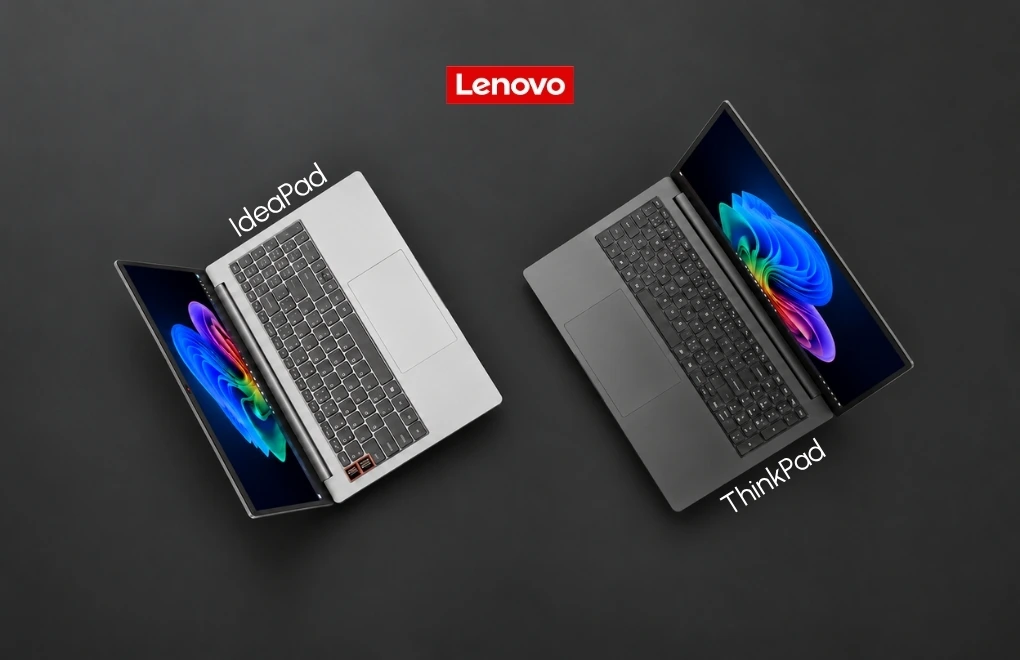
Quick Verdict: Your ideal choice ultimately depends on whether you value multimedia and performance flexibility or business durability and manageability. IdeaPad is generally aimed at everyday computing, students and creators. ThinkPad is built around business use, durability, security, keyboards, connectivity, and long-term professional workloads.
If you are searching for IdeaPad vs ThinkPad, the biggest mistake is treating them as two versions of the same laptop. They are not simply separated by price. Lenovo designed these families around different types of users.
An IdeaPad can be sleek, relatively affordable and surprisingly powerful. ThinkPads, meanwhile, are known for their business-oriented keyboards, TrackPoint, security features, durability testing and enterprise-focused features. That makes the Lenovo IdeaPad vs ThinkPad decision more interesting in 2026.
A student who mainly writes assignments does not necessarily need a business laptop. A programmer who spends eight hours a day typing may care more about keyboard design, ports and sustained reliability than an OLED screen. And a company buying hundreds of laptops has completely different requirements from someone buying their first college computer.
So, what is the difference between ThinkPad and IdeaPad? And which one should you actually choose? Let’s break it down.
| Lenovo Laptop Family | Best For | Key Characteristics |
|---|---|---|
| IdeaPad | Students, Everyday computing, casual users | Affordable configurations, modern designs, productivity, entertainment and everyday performance |
| ThinkPad | Professionals, businesses and enterprise users | Business security, durability, productivity-focused design, excellent keyboards and TrackPoint |
| IdeaPad Pro | Higher-performance consumer computing creators, developers and power users | Stronger processors, premium displays, higher-performance configurations and, on some models, discrete graphics |
| ThinkPad T/X/P/E/L Series | Businesses, professionals and specialized users | Different tiers covering mainstream business laptops, ultraportables, entry-level business systems and workstation-class machines |
Here’s a practical way to understand the difference.
| Feature | IdeaPad | ThinkPad |
|---|---|---|
| Primary audience | Students, home users, everyday users, creators | Professionals, businesses, enterprise users |
| Design | Modern, consumer-oriented | Functional, business-oriented |
| Display options | Often strong multimedia options, OLED available on some models | Usually productivity-focused, though premium models offer better panels |
| Keyboard | Good on many models | Major focus on TrackPoint and spill-resistant designs on many models |
| Durability | Depends heavily on model | Strong emphasis on durability testing |
| Security | Basic-to-good depending on model | More extensive business security options |
| TrackPoint | No | Yes |
| Upgradeability | Varies by model | Varies by model and generation |
| Graphics | Integrated graphics and some discrete-GPU configurations | Mostly productivity-focused graphics, with workstation options in P series |
| Gaming | Better suited in higher-performance IdeaPad configurations | Generally not designed as gaming machines |
| Business management | Limited compared with ThinkPad business lines | Major focus |
| Portability | Many lightweight options | Many lightweight options, especially X/T series |
| Typical buying priority | Features and value | Reliability, security and productivity |
(The table is a family-level comparison, not a specification sheet for every model.)
So don’t buy based on the word ThinkPad or IdeaPad alone.
For most students, an IdeaPad is the smarter choice. If most of your coursework runs in a browser, compare a Chromebook vs a laptop for students first. Students want a light and affordable laptop that has a good screen for long study sessions and can handle streaming after class. IdeaPad Slim models cover all of that at a price that doesn’t hurt. You also get a better display and speakers, which you’ll appreciate more than you’d expect.
There are exceptions. If you’re studying something writing-heavy, like law, journalism or literature, or you’re in an engineering or computer science program, a ThinkPad’s keyboard and durability become worth the extra cost. Students who commute daily with a packed bag should also think about the sturdier build.
A practical middle path: look at the lower-cost ThinkPad E series. It brings the ThinkPad keyboard and a more durable feel at a price closer to premium IdeaPads. For a student planning to keep a laptop through four years of college, that can be a smart pick.
Programming makes this comparison more complicated. A programmer doesn’t necessarily need a ThinkPad. If you’re open to macOS, see which MacBook is best for programming. What matters first is the processor, RAM, storage, display, keyboard, battery, operating system compatibility and ports.
For basic web development, Python, Java, JavaScript, SQL, VS Code and similar workloads, a good IdeaPad can handle the job comfortably.
For heavier development environments, look for:
This is one of the easiest questions to answer but with an important qualification. Neither family should be judged as a single gaming lineup.
Some IdeaPad models have been offered with discrete NVIDIA GPUs, including RTX configurations on IdeaPad Pro models. Lenovo’s IdeaPad Pro 5 16AHP9 specifications, for example, include RTX 3050 and RTX 4050 options.
A ThinkPad is generally designed around productivity and business rather than gaming. Some ThinkPad P-series workstations can have powerful professional graphics, but professional workstation performance and gaming performance are not the same buying category.
If gaming is your main priority, compare:
Don’t assume an IdeaPad with integrated graphics will outperform a ThinkPad simply because it belongs to the IdeaPad family. Likewise, don’t assume a ThinkPad with a powerful processor is automatically a good gaming laptop.
For serious gaming, Lenovo’s dedicated gaming families are generally a more relevant place to look than either a standard IdeaPad or ThinkPad.
This is where the ThinkPad philosophy becomes much clearer. Business laptops have requirements that aren’t obvious on a retail specification sheet.
A company might care about:
ThinkPad is designed around these requirements.
Lenovo’s ThinkPad range includes features such as ThinkShield security technologies, TPM, optional biometric authentication, privacy features and self-healing BIOS on selected models.
The ThinkPad T14 Gen 6, for instance, is positioned by Lenovo as a business laptop and includes features such as a spill-resistant keyboard and TrackPoint.
That doesn’t make every ThinkPad better than every IdeaPad for an individual professional.
So “professional” does not automatically mean “ThinkPad.” It depends on the work.

The premise needs a little qualification: not everyone is using ThinkPad. But ThinkPad has a long-standing presence in professional computing because Lenovo has built the brand around business requirements rather than primarily around consumer styling. Several characteristics help explain its reputation.
The keyboard is probably the most recognizable ThinkPad feature. Many ThinkPads use a TrackPoint positioned between the G, H and B keys, allowing users to control the pointer without moving their hands away from the keyboard.
Lenovo continues to emphasize this as a productivity feature. For someone writing documents or code all day, that design can matter more than a flashy exterior.
Lenovo’s ThinkPad testing program includes MIL-STD methods addressing mechanical shock, vibration, humidity and other environmental conditions.
Again, that isn’t the same thing as being indestructible. It is a design and testing philosophy focused on reliability under demanding conditions.
Business machines often need more than a password. ThinkPad models can include TPM, fingerprint readers, IR cameras, privacy shutters, BIOS protection and other security technologies depending on configuration.
Companies often buy laptops as part of a larger IT environment. That means docking, support, management, security and standardized configurations can be as important as raw processor speed. This is one of the biggest differences between IdeaPad vs ThinkPad.
Yes. But the answer depends on the specific IdeaPad. The IdeaPad family covers a wide range of hardware, from everyday laptops to much more capable Pro models.
A basic IdeaPad may be perfectly suitable for:
A higher-end IdeaPad Pro can go much further.
The 2026 IdeaPad Pro 5 16-inch AMD platform, for example, can offer Ryzen AI 7 350, 24GB or 32GB soldered memory depending on configuration, dual M.2 SSD support and a 2.8K OLED 120Hz display.
That is considerably more than what most users need for basic college work. The important caveat is that IdeaPad specifications can vary dramatically. Some configurations use soldered memory, for example, meaning you cannot upgrade RAM later.
Lenovo’s current IdeaPad Pro 5 specifications explicitly list soldered memory on several configurations. So check the exact configuration before buying.
Display is an area where the comparison isn’t simply “ThinkPad wins.”
In fact, some IdeaPad Pro models have extremely attractive displays.
The IdeaPad Pro 5 14-inch 2026 platform can offer:
Those specifications are available on selected configurations, not every IdeaPad.
By comparison, an entry-level ThinkPad E14 Gen 7 configuration can have a 14-inch 1920×1200 IPS panel rated at 300 nits with 45% NTSC coverage.
That’s a good example of why the ThinkPad badge doesn’t automatically mean a better display. If screen quality is important, compare the actual panel.
This is where ThinkPad has a particularly recognizable identity.
ThinkPad keyboards are designed around long productivity sessions, and selected current models include spill resistance, backlighting and the TrackPoint system.
IdeaPad keyboards can also be comfortable, but the design emphasis is different. For example, the IdeaPad Pro 5 14-inch has a 1.5mm key travel keyboard with backlighting and a large glass touchpad.
Therefore:
For typing-heavy work: compare ThinkPad and IdeaPad keyboards physically if possible.
For touchpad-focused users: the IdeaPad Pro’s large glass touchpad may be appealing.
For TrackPoint users: ThinkPad is the obvious choice because that navigation system is part of its identity.
Battery life is another category where model-to-model comparisons are more useful than brand-level assumptions. Battery capacity can vary significantly.
For example, an IdeaPad Pro 5 16-inch AMD configuration can have an 84Wh battery, while a ThinkPad E14 Gen 7 Intel configuration can have a 48Wh battery.
But battery capacity alone doesn’t determine runtime.
Processor efficiency, display resolution, OLED versus IPS, brightness, refresh rate, background applications and workload all affect battery life.
A high-resolution 120Hz OLED display can consume power differently from a 60Hz 1920×1200 IPS panel. So don’t choose between IdeaPad and ThinkPad solely from the battery number.

Upgradability of laptops is one of the most important things to check before buying in 2026. Some modern laptops increasingly use soldered memory.
For example, Lenovo’s IdeaPad Pro 5 16-inch AMD configurations list soldered LPDDR5X memory with no memory slots.
Some ThinkPad configurations also use soldered memory. The Intel Lunar Lake version of the ThinkPad E14 Gen 7, for example, lists soldered LPDDR5X memory.
But other ThinkPad configurations can provide substantially more upgrade flexibility. A ThinkPad E14 Gen 7 AMD configuration, for example, has two DDR5 SODIMM slots and supports up to 64GB in the listed configuration.
This is exactly why the question shouldn’t simply be:
“IdeaPad or ThinkPad?”
Instead ask:
“Which exact IdeaPad or ThinkPad configuration gives me the hardware I need?”
| Feature | IdeaPad | ThinkPad |
|---|---|---|
| Display | Better multimedia and OLED options | Productivity-focused, premium options available |
| Performance | Strong options, including dedicated GPUs | Business-focused, with powerful workstation options |
| Battery | Varies by model; some offer large batteries | Varies by model; built for mobile work |
| Upgradability | Depends on the model | Depends on the series and model |
| Keyboard & Comfort | Comfortable for everyday use | Excellent for long typing; TrackPoint on many models |
| Best For | Students, creators, everyday users | Professionals, developers, businesses |
There isn’t one universal answer because the two families prioritize different things.
ThinkPad emphasizes professional productivity, security, durability, keyboard design and business requirements. IdeaPad emphasizes everyday computing and offers configurations that can put greater emphasis on displays, consumer features and performance flexibility.
Think about your workload first.
The IdeaPad vs ThinkPad debate isn’t really about which Lenovo name is better. It is about two different laptop philosophies.
IdeaPad is the more natural starting point for students, home users, everyday productivity and buyers who want a laptop that balances work with entertainment and creative use. Higher-end IdeaPad Pro models can also deliver powerful processors, OLED displays and discrete graphics.
ThinkPad makes more sense when your laptop is primarily a work tool. Its keyboard, TrackPoint, security ecosystem, durability testing and business-oriented design are the reasons the family has remained prominent in professional computing.
For 2026, one rule matters more than ever: check the exact model number and configuration before you buy. Two laptops carrying the same family name can have very different processors, displays, memory configurations, storage options and upgrade paths.
That’s the real answer to Lenovo IdeaPad vs ThinkPad: don’t choose the family first. Choose the workload first, then find the Lenovo configuration that matches it.

TheTweaks Editorial Team researches, writes and fact-checks every article on this site. Read how we work, who runs TheTweaks and how to report an error on our Editorial Team page.

For most students, the iPad Air (M4) is the better iPad for note-taking. The iPad Pro (M5) is only worth its extra $450 if you…








Be respectful and constructive. Have a question or feedback? We’d love to hear from you. Contact us at contact@thetweaks.com